Load Profiles
The third block in the Bots tab is Load Profiles.
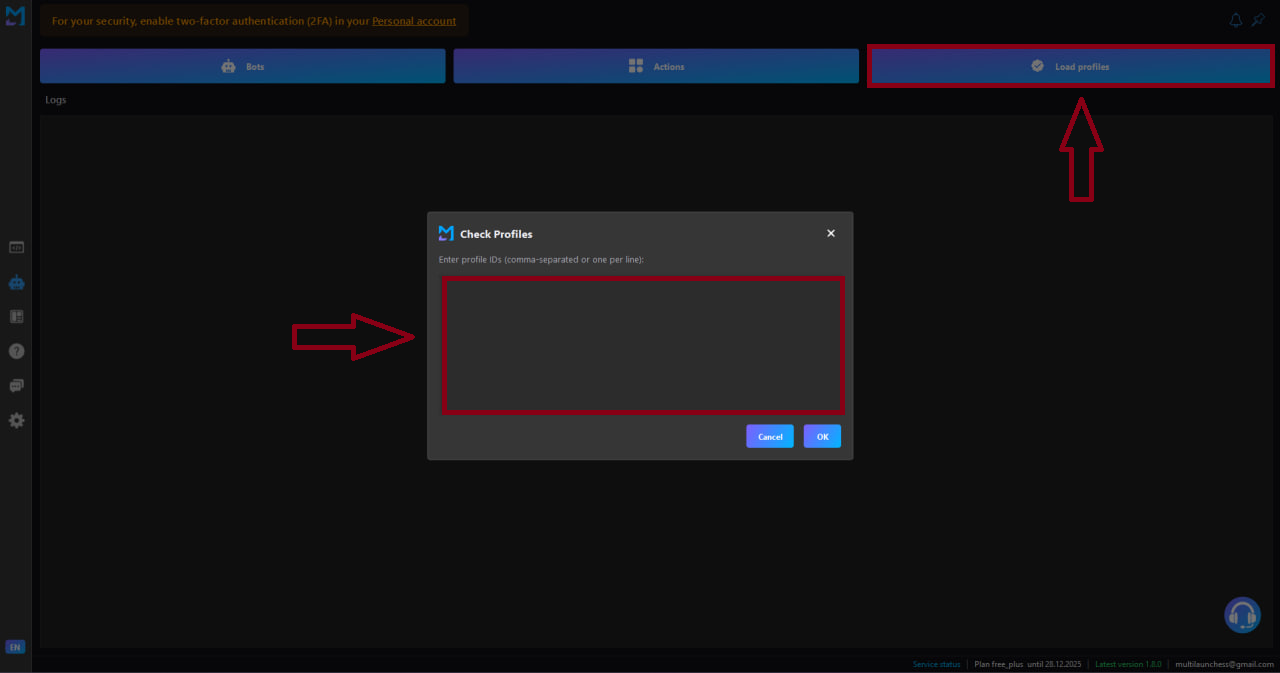
Through this block, you pass a list of profiles from Dolphin Anty or AdsPower into the launcher.
Loading Profiles
- In Dolphin Anty or AdsPower, collect the list of required profiles.
- Copy their IDs.
- In the launcher, open the Load Profiles block.
- Paste the list of IDs into the window.
- Click OK.
After that, the profiles will be available for bot operations.
Shared Profiles for Testnets and Bots
It’s important to understand one key point:
Important
Profiles in the launcher are shared — both for testnets and for bots.
If you:
- first loaded one list in the Testnets tab,
- and then another list in the Bots tab,
then the launcher will use the last loaded list of profiles.
Recommendation
It is recommended to load the full list of all profiles in your farm at once.
This allows you to:
- freely switch between testnets and bots;
- avoid unnecessary profile reloads;
- run any tools on the same unified pool of accounts.